Shadow AI
Staff already use AI tools you never approved. Client data, source code and contracts get pasted into public chatbots, and nobody has a list of which tools or what went in.
Most organizations aren't afraid of AI. They're afraid of deploying it without guardrails. We build the guardrails, so cautious and regulated teams can adopt AI without handing over the data underneath it.
Think of it as an AI security check for your business. Find your shadow AI, your unmanaged API keys, and your biggest gaps in three minutes. Aligned to NIST AI RMF and the OWASP LLM Top 10. No network scan.
Start the analysisPrefer a person? Talk to an engineer. Based in Dallas-Fort Worth, working with teams everywhere.
Your team wants the productivity. Your board wants to know the client data, the PHI, and the trade secrets aren't about to leak into someone else's model. Both can be true, but only if the controls are in place first. Today, in most companies, they aren't: staff paste sensitive data into public tools, there's no policy, and nothing is logged.
Staff already use AI tools you never approved. Client data, source code and contracts get pasted into public chatbots, and nobody has a list of which tools or what went in.
Prompts, uploads and connected apps can carry sensitive data out of your control. Once it sits in a model you do not run, you cannot pull it back or prove where it went.
An AI agent holding a broad token can read and change far more than its job needs. One bad instruction, such as a prompt injection, and it uses all of that access.
Every AI deployment has the same five points where data can slip out. We put a lock on each one.
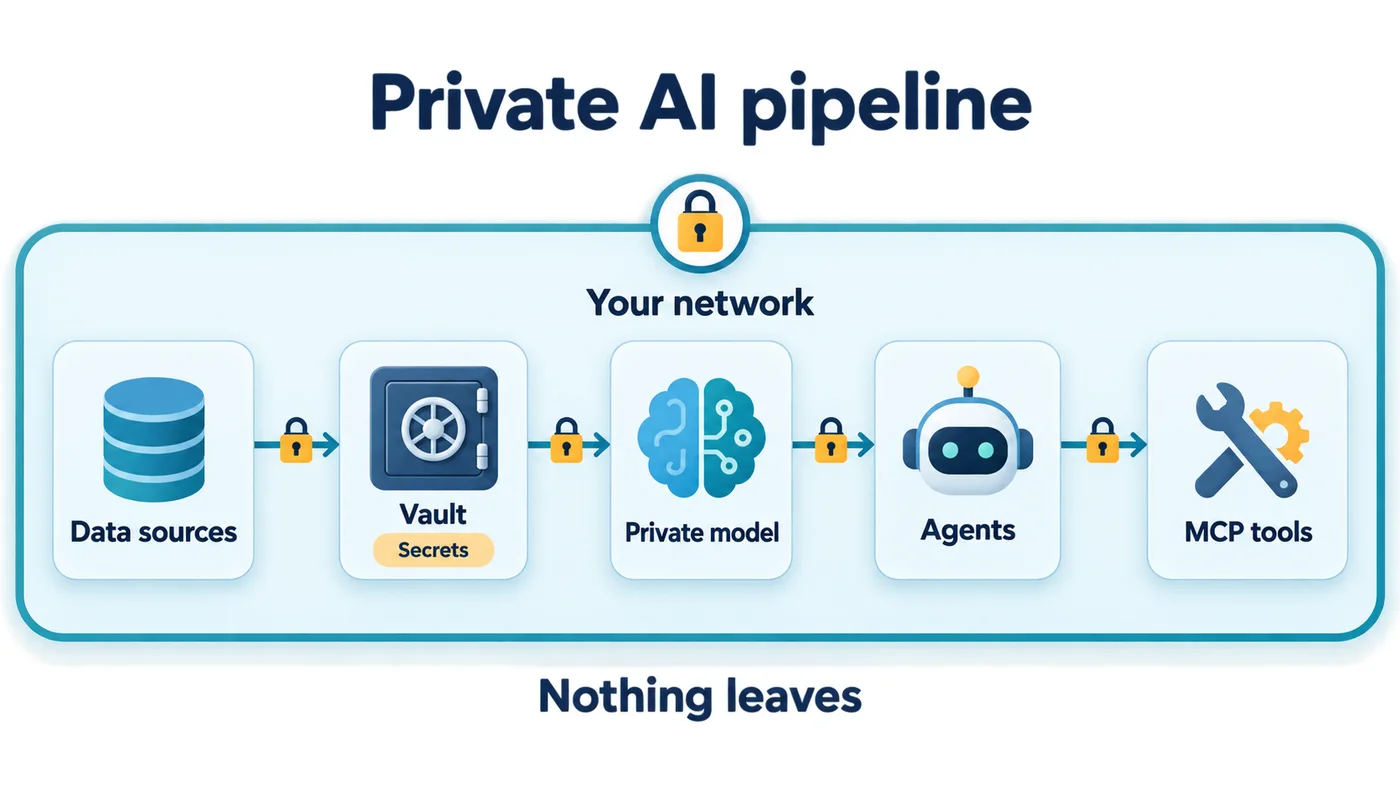
Controls at every stage, from where the data lives to who reviews the output, so AI works for you without becoming your next breach.
Keep sensitive data out of public models. We architect AI to run on-prem or inside your own tenant, so your prompts and outputs stay inside boundaries you control.
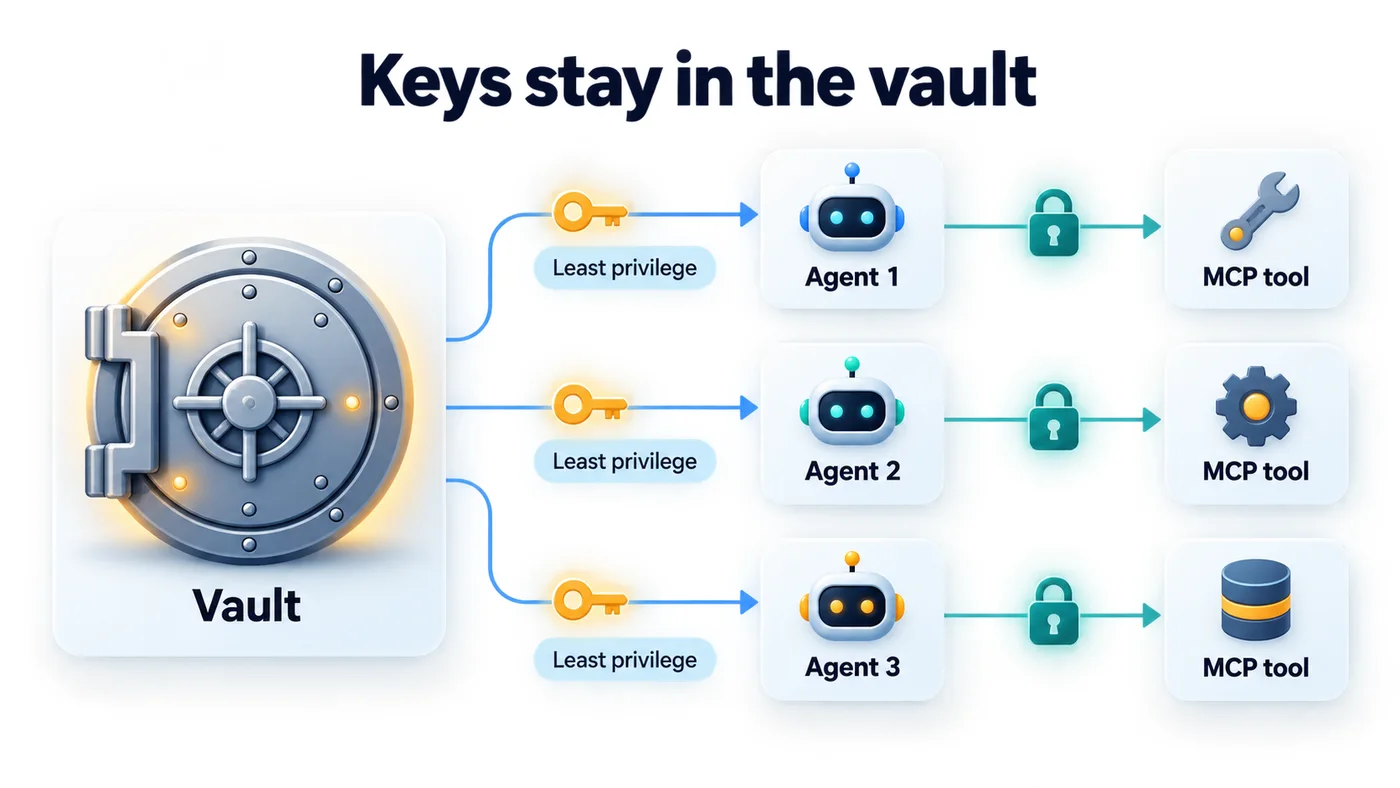
Role-based access to models and data, scoped API keys, and least-privilege service accounts, so only the right people and systems can invoke your AI.
Prompt-injection defense, output filtering, and PII redaction sit between your users and the model, with controls mapped to the OWASP LLM Top 10.
We vet the models, libraries, and vendors in your AI stack. Provenance, licensing, and known vulnerabilities get checked before anything reaches production.
Every prompt, response, and decision logged and reviewable. Full audit trails for regulators, plus monitoring for abuse, data leakage, and model drift.
A written AI-use policy, human-in-the-loop on high-stakes decisions, and staff guidance, mapped to the NIST AI Risk Management Framework.
AI agents need credentials to do real work. We keep those secrets in a vault and give each agent only the access its job requires. If one agent is compromised, the damage stops at its own small slice.
The single biggest risk in enterprise AI is data leaving your control. So for sensitive and regulated workloads, we don't send your data to a model, we bring the model to your data. Private AI that runs on your hardware, in your building, means prompts and outputs never touch a public cloud, and the audit trail is entirely yours.
That's the idea behind Reservoir, our private on-prem AI package, the same "run AI where the data lives" principle, packaged and ready to deploy.
A straight path from "we're nervous about this" to "it's deployed, governed, and we can prove it."
We map where AI touches your data and where the exposure is: shadow AI, third-party tools, and the models already in use.
We design the controls: data boundaries, access rules, filtering, logging, and a written policy scoped to your risk and industry.
We stand the AI up the right way, on-prem or in your tenant where the data is sensitive, with the guardrails wired in from day one.
We watch it in production: audit trails, abuse detection, and periodic review as models, threats, and regulations change.
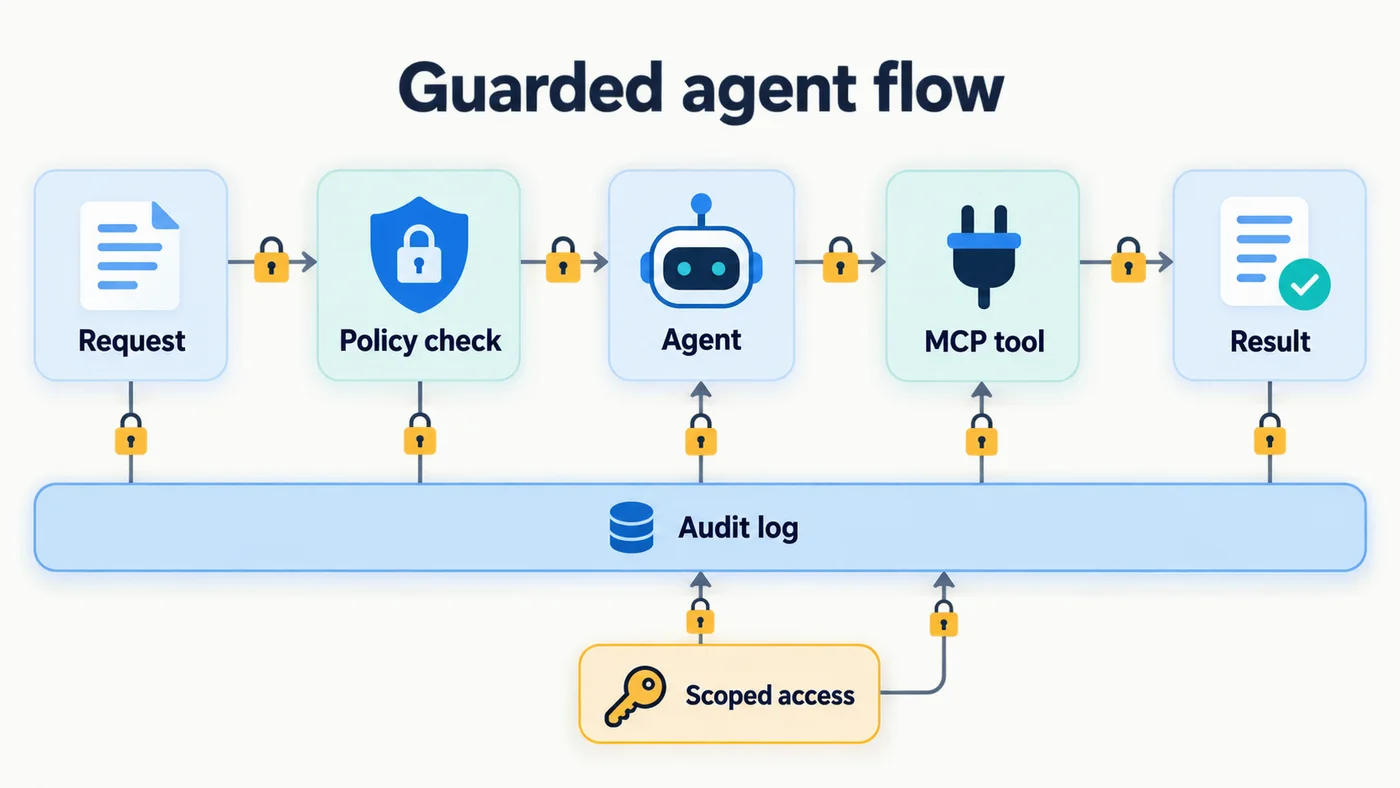
Agents do more than answer questions. They call tools, read files and change things. When an agent calls a tool through MCP, we check the request against policy before anything runs, and every step lands in an audit log. You can see what the agent did and what it touched.
Hidden instructions in a document, web page or email can steer an agent. We filter what goes in and check what the agent tries to do with it.
Agents often run on one all-access key. We issue scoped, short-lived credentials so a single compromised agent reaches only its own slice.
Every MCP server and tool an agent can call is part of your attack surface. We inventory them, approve them, and log every call.
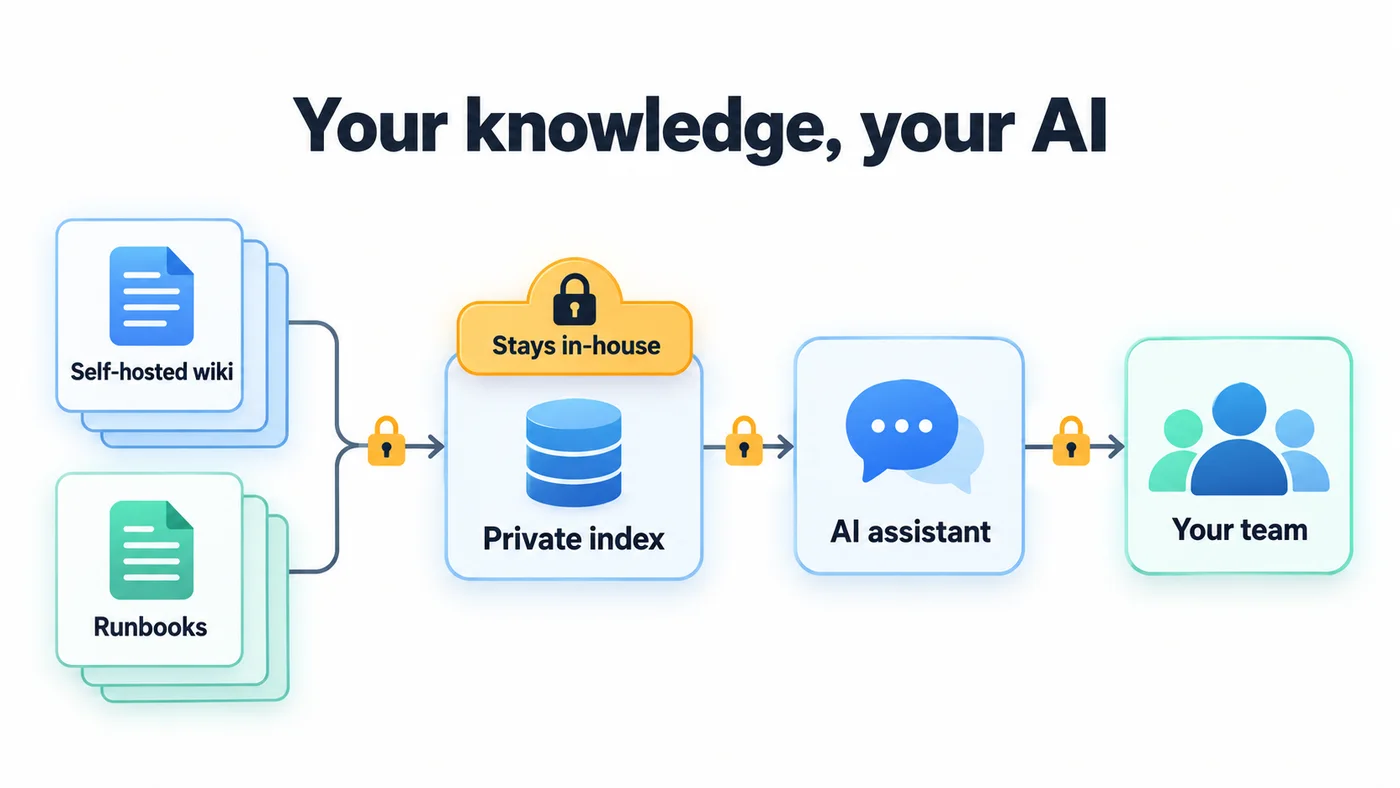
Wikis and runbooks are some of the most useful data you can give an assistant, and some of the most sensitive. We keep the index on your own infrastructure, so your team gets answers without your internal knowledge going to a public model.
A short, fixed-length start so you have something concrete to act on. Scope shifts with your size and how much AI you use.
Which tools, models, agents and API keys are in use, who uses them, and what data they touch.
Where the exposure is, ranked by likelihood and impact, mapped to NIST AI RMF and the OWASP LLM Top 10.
The data boundaries, access rules and filtering to put in place, plus a written AI-use policy for your review.
What gets logged, who reviews it, and how often, with a prioritized list of fixes to start on.
Your options are not limited to doing nothing or banning AI. Here is how the common choices compare. We are a Dallas-Fort Worth (DFW) security team, so the people who answer your call know your environment.
AI use keeps growing in the shadows. You find out about it after the incident, an audit or a client question.
Staff keep using it on personal accounts and phones, and now you cannot see any of it. You also give up the productivity.
You get a report and a slide deck, then your own team has to build, run and watch the controls.
The same team that runs your security monitoring also governs your AI. The controls get built, watched and kept current in one place.
AI security is one part of a wider program. These are the services it connects to.
Ongoing protection and monitoring across your whole environment.
People watching your alerts around the clock, AI activity included.
Find the weak spots in the systems your AI connects to, then fix them.
A plan and a team ready if an AI tool or agent is misused.
A closer look at unapproved AI use and what it costs when it goes wrong.
A deeper review of the AI systems you already run.
We measure your AI program against recognized frameworks, and help you close the gaps, honestly.
The NIST AI Risk Management Framework, the U.S. benchmark for governing, mapping, measuring, and managing AI risk.
The industry list of the top security risks in LLM applications, such as prompt injection and data leakage, each with a control.
The international standard for AI management systems, for organizations that need a formal, auditable governance program.
The questions cautious teams ask us before they adopt AI.
It can be, but only with guardrails in place. The risk is not AI itself; it is sending regulated data to a model you do not control, with no logging and no policy behind it. We put the boundaries, access controls, and audit trails in place so your team can use AI without exposing the data underneath it.
Guardrails are the technical and policy controls that sit around an AI system: where its data can go, who can use it, what goes in and comes out, what gets logged, and who reviews high-stakes decisions. Together they let you adopt AI while keeping it inside the lines your industry and regulators require.
No. For sensitive or regulated workloads we run AI where your data already lives, on-prem or inside your own tenant, so prompts and results stay inside boundaries you control. Our Reservoir package is built exactly for this: private AI that runs on your hardware.
We align our AI security work to the NIST AI Risk Management Framework, the OWASP Top 10 for LLM Applications, and ISO/IEC 42001 for AI management systems. We help you measure against these frameworks and close the gaps. We do not claim they make you automatically compliant.
No. Smaller teams are the ones most likely to have staff quietly pasting sensitive data into public AI tools with no policy at all. The controls scale down: even a written AI-use policy, scoped access, and basic logging cut a large share of the everyday risk.
Shadow AI is any AI tool your staff use that IT has not approved or even seen: public chatbots, browser extensions, AI features inside apps they already have. The risk is the data that goes into them. The first step is finding out which tools are in use, which is what the free analysis starts to show you.
Not by default. Public AI tools may keep what you send, and your staff may be using personal accounts you cannot see. Whether it is acceptable depends on the plan and settings, your contracts and your industry. We help you decide what data can go where, and put a policy and controls behind that decision.
Copilot can surface anything a user already has access to, so oversharing in SharePoint, Teams and OneDrive becomes visible fast. Readiness means cleaning up permissions and labeling sensitive data before you turn it on. We review that with you as part of the AI security work.
Prompt injection is when hidden instructions in text an AI reads, such as a web page, email or document, change what it does. It cannot be fully eliminated today. We reduce the exposure by filtering inputs, limiting what each agent can reach, checking tool calls against policy and logging everything.
Yes. We are based in the Dallas-Fort Worth area and work with clients locally and remotely. The assessment and most of the guardrail work can be done remotely, and we come on site when it helps.
It depends on how much AI you use and how sensitive the data is. The free 18-point analysis shows where you stand first, and a scoped quote follows from that. Many controls, such as a written policy and scoped access, cost little compared with a leak.
Start with a free assessment. We map where AI already touches your business, show you the exposure, and give you a prioritized plan for the guardrails that matter most. There is no obligation.
See the wider security program these controls plug into: Managed Security and our full security services.
Start with the free 18-point analysis. In about three minutes you'll see where AI already touches your business, where the exposure is, and the guardrails that close it. There is no obligation.
Take the Free 18-Point AI Security AnalysisPrefer to talk first? Book time with an engineer.